Managing user access levels: Disable login vs. Deactivate users
Last updated: July 1, 2026
When managing your user list in Hadrius, you have two main options for restricting access: disable login and deactivate users. Understanding the difference between these options will help you maintain appropriate access levels while respecting privacy requirements.
Disable Login vs. Deactivate
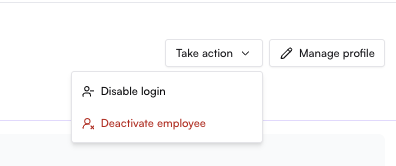
Disable login: When you disable login for a user, their profile continues to exist on Hadrius and all established feeds will continue to flow. The user simply cannot log in to access the platform.
Deactivate: When you deactivate a user, this will break feeds, remove incomplete assigned tasks, and disable their login completely.
Recommended approach for different user categories
When cleaning up your user list, consider organizing users into these categories:
Users who no longer need access
For employees who are terminated or no longer require supervision and are not marketing or communications submitters: Deactivate these users on Hadrius.
Users who need limited access without supervision
For users who need to continue as marketing or communications submitters but should not be supervised:
Mark their trade monitoring accounts as closed
Switch their role to a custom limited access role (such as "Marketing Submitter")
Users who continue to be supervised
For users who should continue normal supervision: Leave these users as is, after ensuring any broken connections are fixed and everything is up-to-date.
This approach helps maintain appropriate privacy boundaries while ensuring the right people have the access they need to perform their roles.