How to resend invitations to users + check platform invitation status
Last updated: July 1, 2026
There are several ways to resend invitations to users who haven't received or lost their original invitation email.
Method 1: Resend from Settings
Navigate to the Settings icon ⚙ (top left)
You'll see a list of users with pending invitations.
Click the paper airplane icon next to the user's name to resend their invitation.
Important: Invites can only be sent once per day per user due to spam prevention controls.
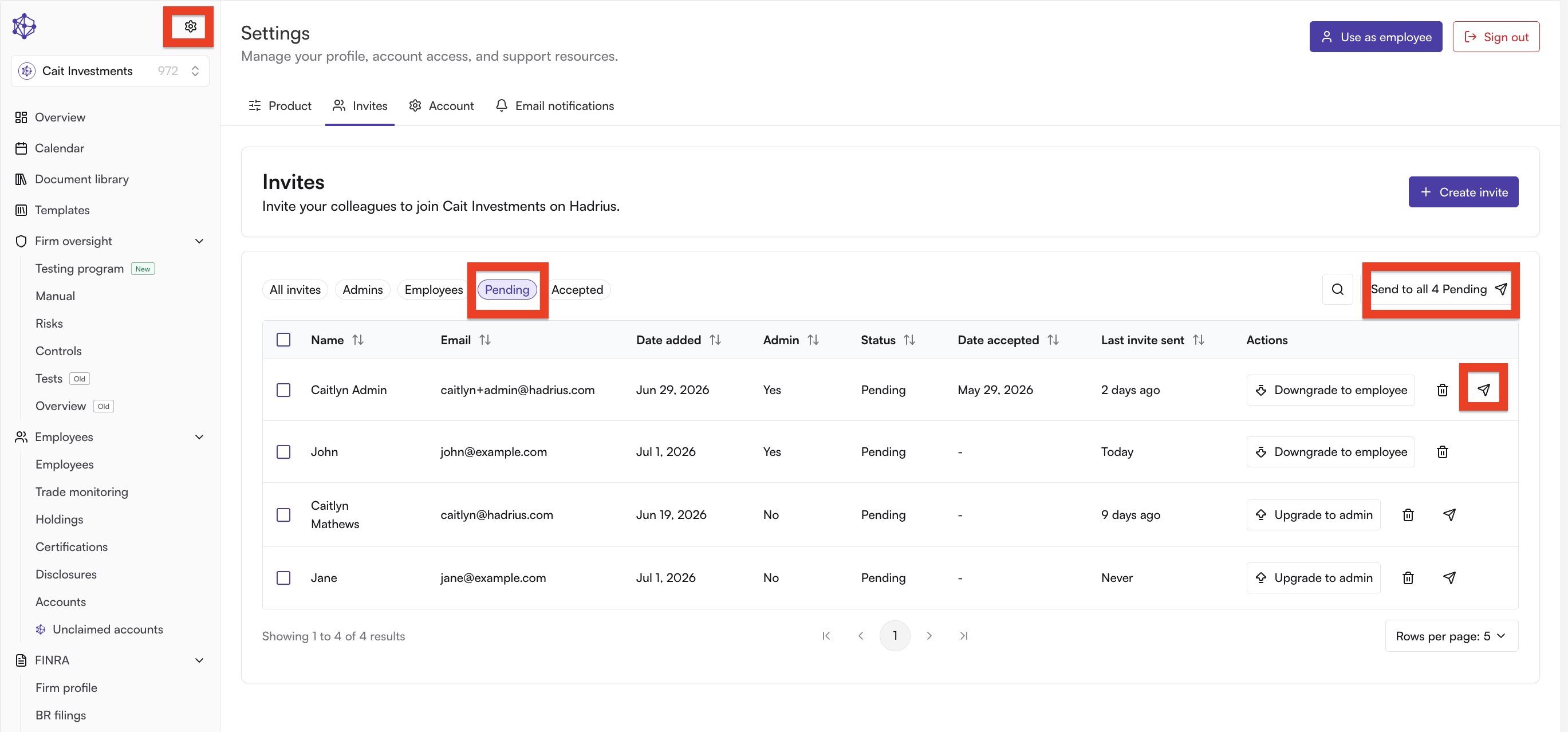
On the left side of your screen, click the gear icon > select the 'Pending' filter > [optional] to send an employee another platform invitation, click the highlighted paper plane icon or 'Send all X pending' to send to all employees that have not created their Hadrius accounts
Method 2: Create a new invite
If you can't find the user in your pending invitations list, you can create a new invite:
Click "Create invite" in the top right corner
Enter the user's email address
Select the appropriate access level (admin or employee)
Send the invite
This method will resend the invitation even if one already exists for that email address.
Method 3: Direct sign-up link
As an alternative, users with pending invitations can visit app.hadrius.com/auth/sign-up to create their account directly, since they already have a pending invite in the system.
Troubleshooting
If a user doesn't appear in your pending invitations list, try refreshing the page. If you still don't see them, use Method 2 to create a new invite.
Remember that the one-invite-per-day limit applies to prevent spam, so if you've already sent an invite that day, you'll need to wait until the next day to send another one.
Common issue: "No account found" during password reset
If a user reports they're unable to reset their password and receives a "no account found" message, this means they have a pending invitation but haven't created their account yet. Users must first use their invitation link (or visit the sign-up page mentioned in Method 3) to create their account before they can reset their password. Resend their invitation using Method 1 or Method 2, and clarify that they need to complete the initial account setup first.