How do I archive my ChatGPT conversations?
Last updated: September 28, 2026
At a glance
Typical setup time: About 10 minutes
Who you need: A ChatGPT workspace owner
What Hadrius reads: Conversation logs and user-uploaded files, read-only
Before you begin
Archiving uses the Compliance API, which is only available on ChatGPT Enterprise and ChatGPT Edu workspaces. If your organization is on ChatGPT Team or a personal plan, contact your OpenAI account representative.
Create an admin key
Sign in as a workspace owner at admin.openai.com and open the Credentials tab. Click Create admin key and give it a recognizable name, such as Hadrius Archiving.
Under Permissions, select Custom, then choose Read for Compliance logging platform. Click Submit and copy the secret value.
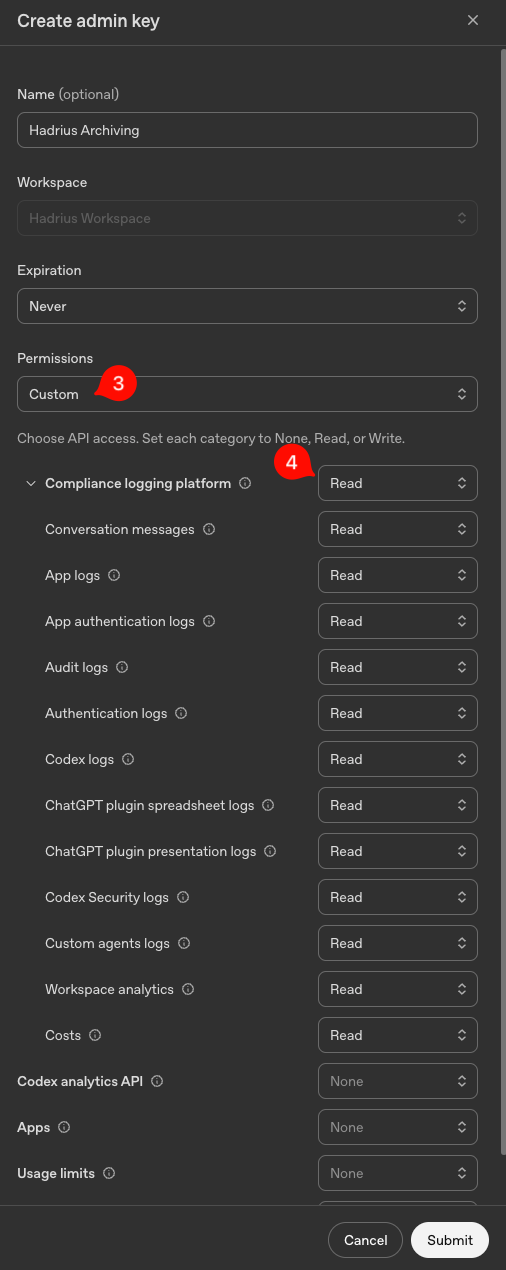
Copy the key before closing the dialog. OpenAI only shows the secret once. If you lose it, you'll need to create a new key.
Copy your organization and workspace IDs
At chatgpt.com/admin, go to Settings → General and copy the Organization ID and Workspace ID.
Add the values to Hadrius
Paste the admin key into the API Key field below. Then paste the IDs into the Organization ID and Workspace ID fields.
FAQ
What can Hadrius do with this key?
The key is read-only and scoped to compliance logs. Hadrius uses it to archive conversation transcripts and uploaded files. It cannot post to ChatGPT, change settings, or write to your workspace. Hadrius stores the key encrypted and scoped to your firm.
Does Hadrius need an admin login or SSO access?
No. The key and the two IDs are all Hadrius needs.
Troubleshooting
Archiving stopped after the key was revoked
If you revoke the key in the OpenAI admin console, archiving stops at the next sync and your Hadrius admins see an error. To resume, create a new key and paste it into the API Key field below.
I don't see the Compliance logging platform permission
This permission only appears on Enterprise and Edu workspaces. Confirm your plan with your OpenAI account representative.