How to update or close an Outside Business Activity (OBA) disclosure
Last updated: July 19, 2026
Due to compliance requirements, Hadrius follows WORM (Write-Once-Read-Many) principles, which means you cannot directly edit an existing OBA disclosure once it has been submitted and approved. However, you can close an existing OBA or submit a new one with updated information.
Closing an existing OBA
To mark an OBA as inactive or closed:
Navigate to the Disclosures section in your Hadrius account
Select Outside Business Activity from the disclosure templates dropdown
Look for the option to "Close an existing one" and select Yes
Choose the specific OBA you want to close from the dropdown menu
Complete the form and submit
Important: The closure date will be recorded as the date you submit the closure in Hadrius and cannot be backdated. If you close an OBA after the activity has already ended, it will still appear on attestations covering the period when it was active in the system. To ensure accurate attestation reporting, close OBAs in the platform as soon as the business activity ends.
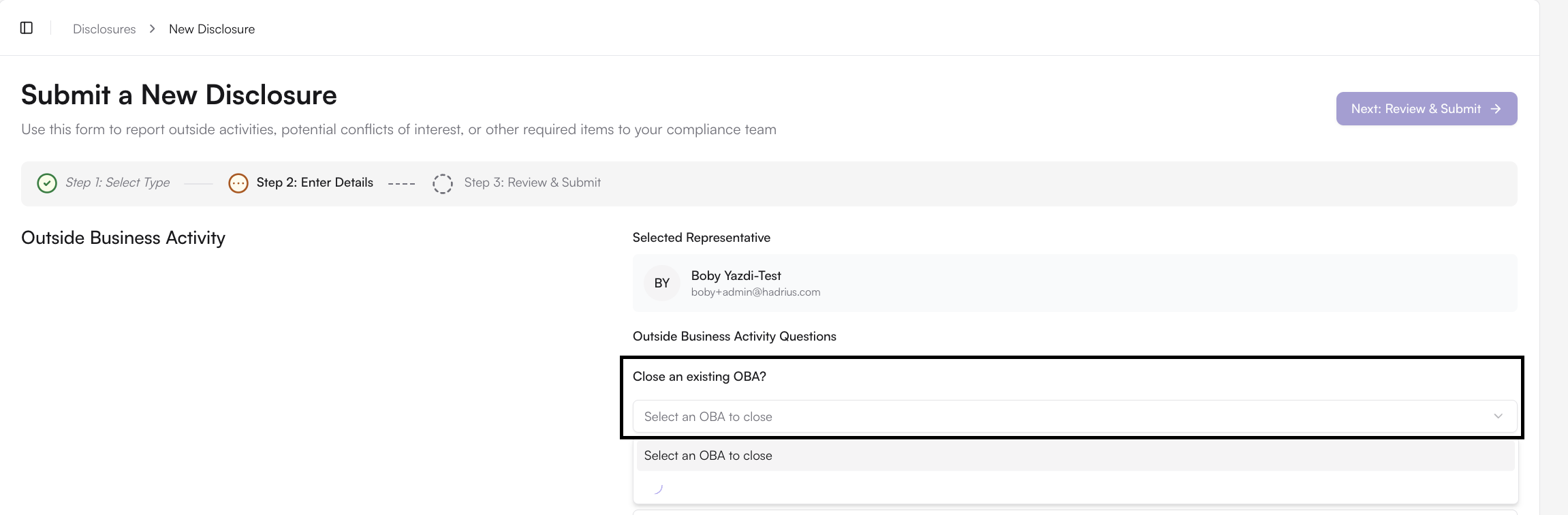
Once closed, the OBA will appear in your disclosure history with an inactive status for record-keeping purposes.
Updating OBA information
If you need to update details about an active OBA (such as income changes, role modifications, or other information), you'll need to:
First close the existing OBA using the steps above
Submit a new OBA disclosure with the updated information
This process ensures compliance with document retention requirements while allowing you to maintain current and accurate disclosure records.
If you have previously reported business activities that are still active, you do not need to resubmit them unless the details have changed. Your existing approved disclosures remain valid.